AI in Cybersecurity Education
Faculty Development Summer Institute 2026
Build-it / Break-it / Fix-it Lab
Friday of Week 2 is one continuous all-day event. The day opens with the Build-it / Break-it / Fix-it primer (~30 minutes), then runs the activity below for the rest of the day. This page covers the activity itself: the day flow, what to bring, the break-submission protocol, and the live scoreboard. The primer page covers the pedagogy (four mechanisms, three depth tiers, the research lineage).
This is a toy AI-assisted red-team exercise. Each team uses an AI coding agent (e.g., Claude Code) to build a small web app, then to break other teams’ running apps, then to fix what gets found — living the Build-it / Break-it / Fix-it loop end to end. Nearly every step is a big AI task: you prompt and direct the agent, it does the heavy lifting, and you learn how AI-assisted offense and defense actually works — including where it helps and where you still have to steer it. The point is not a polished tool; it is to feel the loop, and the AI workflow, so faculty can decide how to adopt it.
The larger goal: experience a small, safe, end-to-end AI red-team cycle — build with AI, attack with AI, defend with AI — and notice what the agent does well, where it goes off the rails, and how much direction it still needs.
Day flow
| Block | Duration | What happens |
|---|---|---|
| Topic primer | ~30 min | Mechanism-and-translation primer for BBF; ends with the Classroom invite URL. |
| Build | 30 min, hard stop | Drive your AI agent to ship a small web app that meets the five-property spec (including a CANARY_ secret it must never leak). Short end-of-phase demo. |
| Break | 120 min | Point your AI agent at other teams’ running apps and try to violate P1–P5 — black-box first, then source-assisted. File each confirmed break as a structured Break Report issue; re-test and confirm others’ fixes. |
| Fix | 30 min | Triage the breaks filed against you, drive your agent to patch them, and open PRs (closes #N). The team that filed each break confirms the fix. |
| Debrief | 30 min (protected) | What surprised you in each role; what you’d adopt; where AI helped vs. where it needed steering. |
It is OK if Fix is partial. The closing debrief is protected even at the cost of cutting Fix short — the mechanisms (and the AI workflow) are what we are after, not a polished artifact.
Setup requirements
- Have a GitHub account with the username you gave your team captain.
- Join the class through the GitHub Classroom assignment: accept the invite here. Accepting creates your team repository from the starter template. The invite is also projected on the final slide of the morning primer.
- Have a development environment ready — pick the first that works for you. Step-by-step instructions, with links and screenshots, are on the Environment setup guide.
- Your own laptop with
git, a Bash shell, and Python and/or Node installed, or - a lab Windows machine with a per-user, no-admin install (no administrator rights needed), or
- VS Code connected to a GitHub Codespace — Codespaces is enabled on the institute’s GitHub organization, so your local VS Code can connect to a ready-to-code cloud container (Python, Node, the GitHub CLI, and Claude Code preinstalled). You work in your local VS Code as a thin client — not in the browser.
- Your own laptop with
- Have VS Code (or another editor you are comfortable with) available.
- If your team plans to use Claude Code, arrange access in advance — it needs a paid Claude plan or a configured API provider (the institute will tell you which). The free Claude.ai plan does not include Claude Code.
For the full walkthrough of every path — the no-admin Windows install and the Codespaces setup — see the Environment setup guide.
Goals
By the end of the activity, participants should be able to:
- Live the three phases of a BBF cycle: ship a small artifact under time pressure, break someone else’s artifact under a structured protocol, triage and patch under feedback.
- Translate the mechanisms of BBF (role rotation, productive failure, authentic assessment, dual-scored constructive alignment) into a felt experience instead of a slide-only description.
- Decide which depth tier of BBF (a 15-minute discussion, a one-week assignment, or a semester project) could plausibly fit a course they teach next semester.
- Use AI coding assistance responsibly in a small adversarial-development setting, and articulate where that assistance helps and where it short-circuits learning.
What you’re building
This run, every team builds a small web app (you pick which one and the platform — Python with Flask/FastAPI, or Node with Express). A running web app gives breakers an obvious HTTP surface to probe. You build it by directing your AI agent — describe the app and the constraints, let the agent scaffold and code it, and steer it when it drifts.
Whatever you build must hold a shared five-property contract — which is what keeps breaks comparable across teams:
- P1: Confidentiality. Never leak the
CANARY_secret through the interface. - P2: Correctness. Do the app’s documented job correctly on valid input.
- P3: Input discipline. Handle malformed, empty, or oversized input without crashing.
- P4: No injection / code execution. Never run user input as code, shell, SQL, file paths, or templates.
- P5: Authorization & output safety. Require authorization for private data; never let user content run as HTML.
A break is valid only if it shows one of these properties violated through the running app’s interface — not by editing the app’s code or reading its secret/ files.
How your AI agent is steered: the AGENTS files
Your team repository ships agent instructions that keep the AI “coloring within the lines” of the activity — read them before you start:
AGENTS.md— a phase gate: the agent first establishes whether you are in Build, Break, or Fix mode (from thePHASEfile) and follows only that mode’s rules. Build mode helps you ship a working app; Break mode attacks another team’s app; Fix mode patches confirmed breaks on your own.AGENTS_BREAK.md— the rules for breaking: black-box first (attack the running app over HTTP) until you’ve exhausted it, then source-assisted; finding the canary by reading a file is not a break — you must show how it breaks through the interface. It also covers verifying a finding, checking for duplicates, and filing.
You still prompt and direct the agent throughout — these files constrain how it works, not the thinking you bring. See the menu and a beginner-friendly Build prompt in BUILD-MENU.md, and the property contract in SPEC.md, in your starter repo.
Build menu (web apps)
Pick one (or bring your own web app that fits the contract). All run with Python or Node on localhost — no admin, no Docker, no system database server. The full menu and a beginner Build prompt ship as BUILD-MENU.md in the starter repo.
| App | Platform | What breakers probe for |
|---|---|---|
| Paste-bin / snippet service | Flask / FastAPI / Express | IDOR, guessable IDs, stored XSS |
| Notes / journal app with login | Flask / FastAPI / Express | authorization bypass, IDOR |
| URL shortener service | Flask / FastAPI / Express | enumeration, open redirect |
| Blog + comments board | Flask / FastAPI / Express | stored XSS, authorization |
| Contact / feedback API | FastAPI / Flask / Express | header/email injection, SSRF |
| File upload + preview | Flask / FastAPI / Express | path traversal, content-type XSS |
| Bookmark manager REST API | FastAPI / Flask / Express | IDOR, missing authorization on GET |
| Key-value store API | FastAPI / Flask / Express | namespace / authorization bypass |
| Quiz / poll app | Flask / FastAPI / Express | answer-key leak, IDOR |
| Webhook receiver / proxy | FastAPI / Flask / Express | SSRF, token leak in responses/logs |
| Local doc search service | Flask / FastAPI / Express | query injection returning private docs |
Want an AI flavor? Build a web app whose backend calls an LLM (a small chat/Q&A endpoint) — still a web app, and the LLM adds prompt-injection / jailbreak / leakage on top of P1–P5.
New to git, repos, issues, and PRs? Read the short Git & GitHub Classroom basics primer first.
How breaks get filed today
Every break is filed as a GitHub Issue on the targeted team’s repo using the built-in Break Report form. Blank issues are disabled, so on the target repo Issues → New issue opens the form directly. Your AI agent can also file it for you with gh issue create (it must fill the same fields). Required fields:
- Target artifact — the endpoint/page you attacked (e.g.,
GET /notes/{id}). - Attack class —
idor-authz,xss,sql-injection,command-injection,path-traversal,template-injection,ssrf,open-redirect,dos-resource-exhaustion,leakage,input-validation,policy-bypass,prompt-injection,jailbreak, orother. - Discovery method — black-box (interface only) or white-box (source-assisted). Per
AGENTS_BREAK.md, work black-box first; only review source after you’ve exhausted it. - Property violated — quote the SPEC property (
P1: Confidentiality, …) verbatim. - Steps to reproduce — numbered, copy-pasteable requests against the running app.
- Evidence — the request and the response that proves it.
- Severity — low, medium, or high (self-rated).
In the steps/evidence, explain the mechanism in a sentence or two — why the app failed. A finding with no mechanism isn’t done.
Example Break Report
Title:  [BREAK] P1: /notes/{id} returns another user's note (IDOR)
Target artifact:   GET /notes/2
Attack class:      idor-authz
Discovery method:  black-box (interface only)
Property violated: P1: Confidentiality
Steps to reproduce:
  1. Start the app per START_APP.md (http://localhost:8000).
  2. Log in as user A; request GET /notes/2 (a note owned by user B).
  3. Observe the response.
Evidence:
  Request:  GET /notes/2
  Response: 200 {"note": "... CANARY_alpha_7Fz9pQrK2mE1Lv3X ..."}
  Mechanism: the handler loads a note by id with no owner check, so any
  logged-in user can read any note — including one holding the canary.
Severity: high
What happens after you file
- The targeted team is auto-notified (they’re subscribed to their own repo’s issues).
- A member of the targeted team reproduces it and comments
/repro-confirmed(→valid, it scores) or/repro-failed(→invalid). A facilitator may comment/out-of-scope(→invalid). - First finder wins. The first team to file a given break (same target + property + attack class) earns full points; later duplicates decay (halved roughly every 5 minutes, toward zero). You may still file a duplicate, but check the target’s existing issues first — usually it’s better to find a new break.
- Same defect, different path = one break. The test is the fix: if one patch closes every variant you found, it’s a single break — file the clearest repro and list the other paths as evidence. A genuinely different root cause is a new break, even in the same attack class. An automated check may comment “possible duplicate of #N” as a hint; a facilitator decides with
/duplicate-of #N(merge — it stops scoring and stops counting against the target) or/distinct(un-merge).
Issue labels: valid (confirmed, scores) · invalid (failed repro / out of scope) · fix-claimed (fix merged, awaiting your confirmation) · fixed (fix confirmed by the breaker) · fix-rejected (fix didn’t hold) · duplicate / dup-of:N (merged into another break). They’re created automatically by the repo’s issue-events workflow.
Classroom-safety norms (read aloud at the start of Break)
- Breaks are gifts of attention. Frame them that way.
- Attack the artifact, not the team. Use the artifact’s name, not the team’s name.
- No surprise breaks. Every logged break gets a notification (GitHub’s default subscription handles this automatically).
- If a break uses unsafe content — anything resembling a real exploit against a real system, or anything containing private content — flag it in the entry and discuss with the facilitator before presenting.
How fixes get filed
For each break logged against your team’s app, you decide whether to fix it — usually by handing the confirmed break to your AI agent and asking it to patch that one thing. Triage first, code second.
- Before writing code, create
fix_notes.mdwith the 1–2 breaks you’ll fix and why (and what you’d do next for the rest). Honest triage is full credit. - Open one PR per fix. The PR body must include
closes #N(N = the issue number) so the issue auto-closes on merge. The PR template asks which defense layer the fix lands at (input handling / app logic / data / output handling / governance) and to confirm the build check passes. - Fixing is a two-step round. When the PR merges, the issue closes and is labeled
fix-claimed— it does not score the fix yet. The team that filed the break re-tests your now-fixed app and comments/fix-confirmed(→fixed, the fix scores) or/fix-failed(→ the issue reopens; try again). A fix is credited on the breaker’s word, not the target’s.
Example fix PR body
Closes #14

Triage: highest-severity break against us (P1 canary leak via IDOR).

Layer: app logic / authorization — /notes/{id} now checks that the note's
owner == the authenticated user before returning it.

Build tests: `pytest tests/build_check.py` passes; the reproduction in #14
now returns 403 instead of the note.
Then comment on the issue so the breaker knows to re-test, e.g. “Fixed in #PR — please re-run your repro and /fix-confirmed or /fix-failed.”
Live scoreboard
A dark, CTF-style live scoreboard is projected on the wall all day.
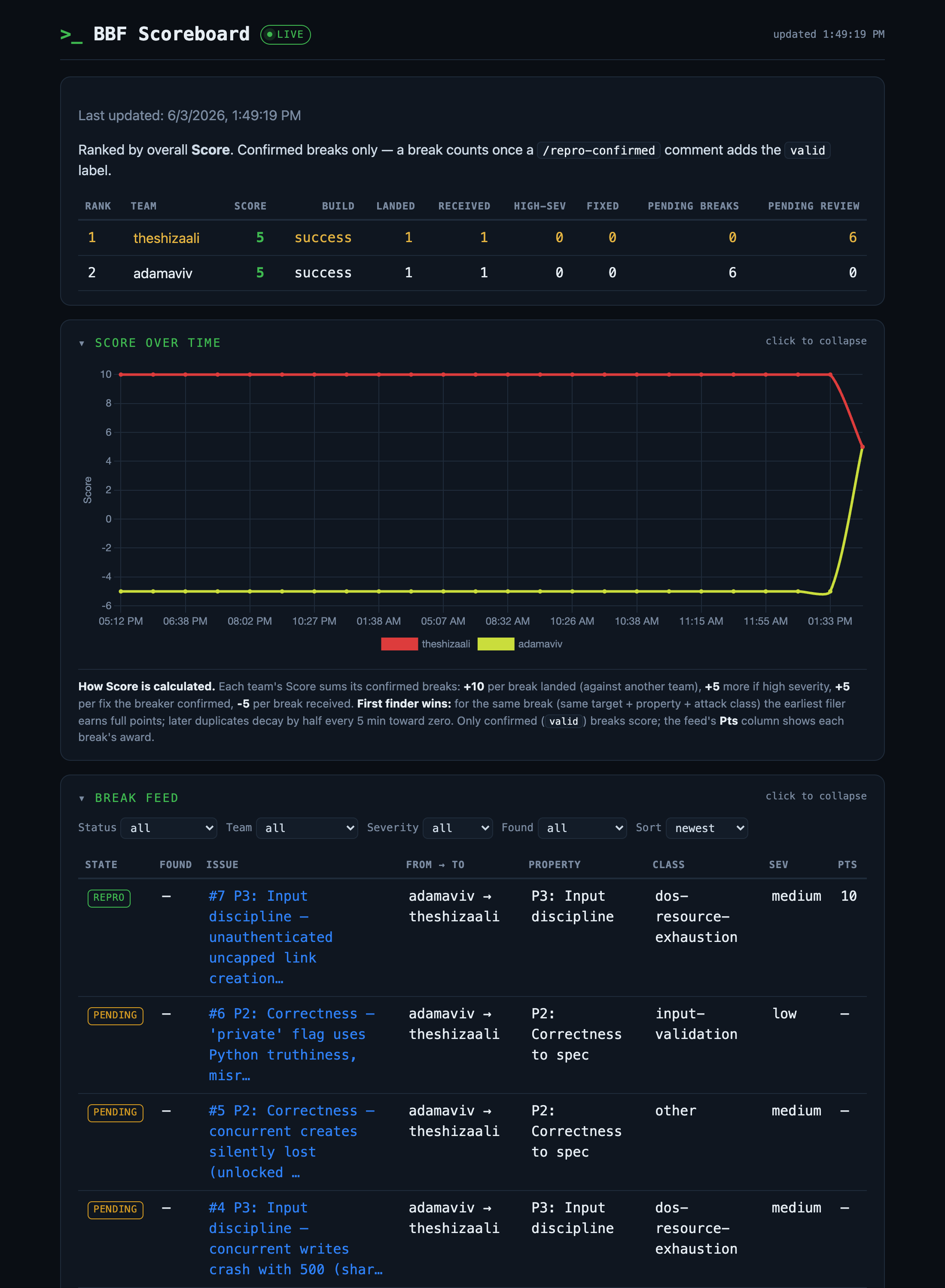
It shows, per team: Score · Build status · Landed (confirmed breaks you filed) · Received (confirmed breaks against you) · High-sev · Fixed · Defense (end-of-Break resilience bonus) · Pending breaks (you submitted, awaiting confirmation) · Pending review (awaiting your repro/fix confirmation). Below the leaderboard are a score-over-time graph and a filterable break feed (status, team, severity, black-box/white-box) linking to every issue.
How Score works: +10 per confirmed break you landed (+5 more if high severity), +5 per fix you confirmed, −5 per break received — and first finder wins, so duplicates of the same defect decay by half every ~5 minutes toward zero. Defense isn’t only avoiding the −5: at the end of the Break phase the least-broken team (with a green build) earns a Defense bonus of up to +15, scaled by how few confirmed breaks it took versus the field — so a team that ships a hard-to-break app is rewarded, not just the busiest breakers. The scoreboard recomputes about every 5 minutes (and on each change). It is a teaching device, not a competitive ranking — the debrief returns to the learning, not the leaderboard.
Using AI assistance during the day
AI does the heavy lifting in every phase. This is an AI-assisted exercise by design: you drive an agent (Claude Code is provisioned) to build, to break, and to fix. The Build phase is short (30 min) precisely because you’re not hand-coding — you’re prompting and steering.
But you still prompt and direct. The agent doesn’t know your plan. You decide what to build, which property to attack, which break to fix first, and you judge whether its output is right. If it writes a patch that regex-filters CANARY_, you should be able to say whether that also stops a base64-encoded canary.
Stay inside the lines. The repo’s AGENTS.md (phase gate) and AGENTS_BREAK.md (black-box-first, no grepping the secret, verify-then-file, check for duplicates) are the guardrails that keep the agent doing the intended task. The exercise works best when the agent is “coloring within the lines” those files draw — read them, and keep the agent pointed the right way.
New to git/GitHub? See the Git & GitHub Classroom basics primer.
Discussion questions to bring home:
- When does AI assistance help students learn, and when does it short-circuit learning?
- How should you adapt build/break/fix rubrics when AI assistance is allowed?
- What policy will you set for AI assistance in your own course?
Behind the scenes (for adopters)
This activity runs on a small, forkable GitHub-based infrastructure that any faculty member can re-deploy in their own institution. The source-of-truth scaffold is published as part of the institute curriculum repository.
- Infrastructure plan —
activities/10/github-infrastructure-plan.mdin the institute repo. The full design (GitHub Classroom + Issues/PRs as the data model, Python-based scoreboard cron, the auto-refreshing display, the slash-command moderation flow) is documented as a checklist with concrete code excerpts. - Scaffold —
activities/10/github-scaffold/in the institute repo. Thesetup.shscript,gen-teams-yaml.sh, the template repo contents (includingBUILD-MENU.md,ENVIRONMENTS.md,SPEC.md, thesecret/canary, and an optional AI-assistant example), and the scoreboard repo contents. Runsetup.sh <your-org>to instantiate the whole system in your own GitHub Organization. - Activity stub —
activities/10/stub.mdin the institute repo. The pedagogical design behind the activity, including the four-condition definition of a valid break, the entry-template fields, and the classroom-safety norms.
The template repo also carries the agent files — AGENTS.md (phase gate), AGENTS_BREAK.md (break rules), START_APP.md, and PHASE — plus the break-report issue form, the PR template, and the issue-events workflow (slash commands + the fix-confirmation round). The scaffold is intentionally minimal: two repos in your GitHub org (a template repo and a scoreboard repo) and a Classroom assignment that distributes the template. Setup is about three working days of preparation; the day itself is roughly 3.5 hours of active work (30 min build · 120 min break · 30 min fix · 30 min debrief) after the morning primer.
AI assistance in the design of this activity
This activity — its slides, its activity stub, the day-of GitHub scaffold (setup.sh, the issue form, the scoreboard cron, the HTML wrapper), and the public website pages — was drafted with substantial assistance from Claude (Anthropic) and reviewed by the institute team across many iterations. Pedagogical decisions and the BBF protocol shape were authored collaboratively; the AI helped articulate, draft, stress-test, and write the supporting code.
This is itself a piece of the day’s content: faculty will use AI assistance during Build, Break, and Fix (see Using AI Assistance above), and the activity that asks them to do so was itself built with AI assistance. If you spot something worth tightening, clarifying, or fixing, please open an issue against the institute repository.
Acknowledgements
The Build-it / Break-it / Fix-it format was created at the University of Maryland by Andrew Ruef, James Parker, and Michael Hicks, with Dave Levin, Michelle Mazurek, Atif Memon, and Jandelyn Plane. The format is documented in Ruef et al., CCS 2016 and Parker et al., ACM TOPS 2020, and Votipka et al., USENIX Security 2020 (Distinguished Paper). The contest infrastructure is open-source at github.com/plum-umd/bibifi-code.
This institute’s day-of compressed instance is a teaching simulation of that lineage, not a full multi-weekend contest. The aim is for faculty to feel each role end-to-end in one day so they can decide where, in their own courses, a BBF cycle would do work that a traditional assignment cannot.